75" vs 85" Inch TV — Which Size Is Right For You?
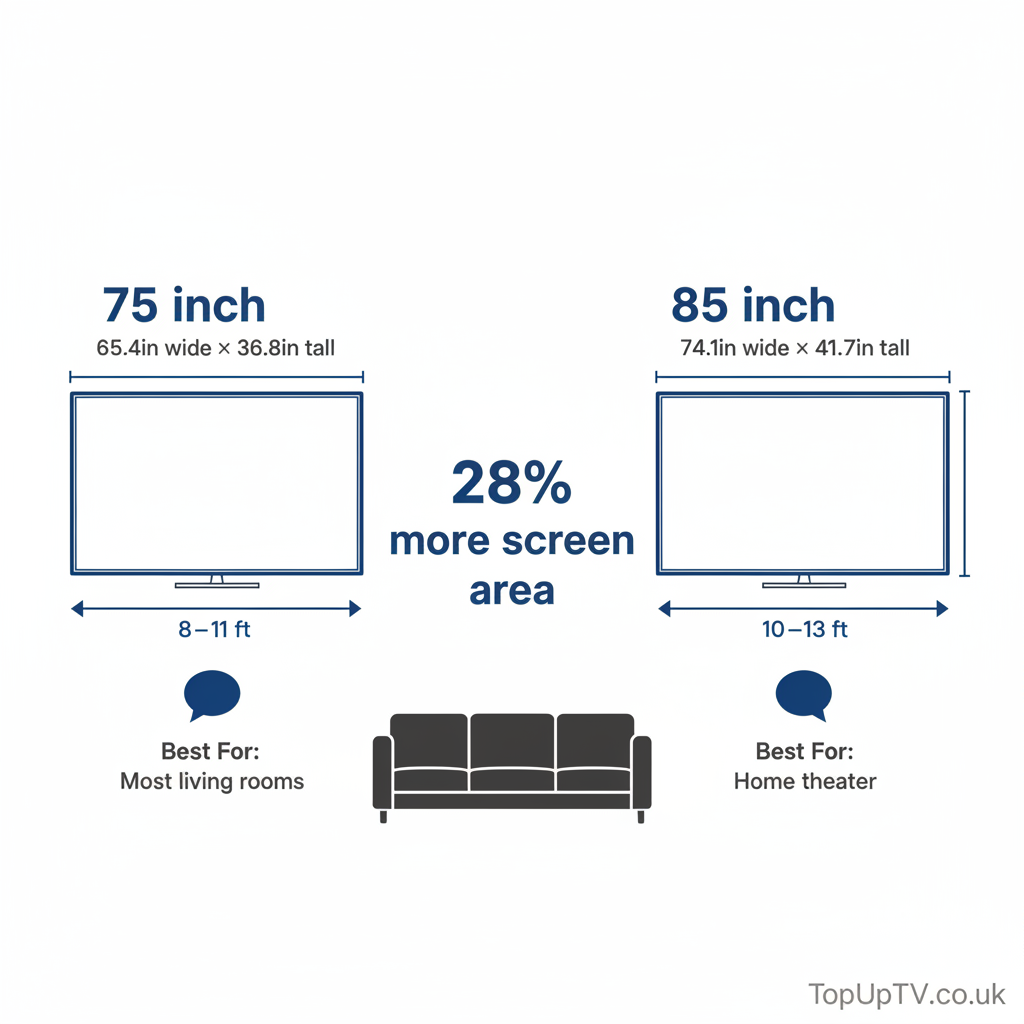
The 85" screen is 28% larger in area and 13% wider than the 75". Here's everything you need to decide — dimensions, distances, room fit, and our honest recommendation.
Quick Recommendation
If your seating distance is under 10 feet, choose a 75″ TV. At 10+ feet, an 85″ delivers a true cinema experience.
Last Updated: November 2026
Actual Size Comparison — To Scale
75-inch TV
166×93.4 cm
more screen
85-inch TV
188.2×105.9 cm
Width diff
+8.7"
(+22.2 cm)
Height diff
+4.9"
(+12.5 cm)
More screen
+28%
area increase
Overall Score
Overall Score
Dimensions at a Glance
Width
Height
Width (cm)
Height (cm)
Screen Area
Area Increase
| Specification | 75" | 85" |
|---|---|---|
| Diagonal | 75" | 85" |
| Width (inches) | 65.4" | 74.1" |
| Height (inches) | 36.8" | 41.7" |
| Width (cm) | 166 cm | 188.2 cm |
| Height (cm) | 93.4 cm | 105.9 cm |
| Width (m) | 1.66 m | 1.88 m |
| Screen Area | 2403.8 in² | 3087.6 in² |
| 4K Min Distance | 6.3 ft / 1.9 m | 7.1 ft / 2.2 m |
| 4K Max Distance | 9.4 ft / 2.9 m | 10.6 ft / 3.2 m |
| 1080p Min Distance | 9.4 ft | 10.6 ft |
| Ideal Room | Large Living Room / Home Cinema | Home Cinema / Basement |
| Weight (approx) | ~30 kg | ~40 kg |
| Min Stand Width | 67" | 76" |
| Immersion Level | ★★★★★ | ★★★★★ |
Full Comparison Table
| Specification | 75" TV | 85" TV |
|---|---|---|
| Width | 65.4" (166 cm) | 74.1" (188.2 cm) |
| Height | 36.8" (93.4 cm) | 41.7" (105.9 cm) |
| Screen Area | 2403.8 sq in | 3087.6 sq in (+28%) |
| Recommended Room Size | Large living room (200–300 sq ft) | Large / open-plan room (250+ sq ft) |
| 4K Viewing Distance | 6.3–9.4 ft | 7.1–10.6 ft |
| Gaming Suitability | ★★★★☆ Very Good — cinematic | ★★★☆☆ Good — cinematic only |
| Movie Suitability | ★★★★★ Outstanding — home theater | ★★★★★ Outstanding — cinema-grade |
| Best for Apartments | ❌ Too large for most | ❌ Too large for most |
| Best for Living Rooms | ✅ Excellent for large rooms | ✅ Outstanding for large rooms |
Which Size Is Right for You? — Decision Table
| Factor | 75" | 85" | Winner |
|---|---|---|---|
| Screen area | 2403.8 in² | 3087.6 in² | 85" |
| Ideal room | Large Living Room / Home Cinema | Home Cinema / Basement | Depends |
| Min viewing distance | 6.3 ft | 7.1 ft | 75" |
| Gaming immersion | 5/5 | 5/5 | 85" |
| Movie experience | Good | Cinematic | 85" |
| Sports viewing | Good | Great | 85" |
| Apartment fit | Good | Tight | 75" |
| House fit | Good | ✓ Better | 85" |
| Price range | £900–£2,000 | £1,500–£3,500 | 75" |
| Annual energy cost | ~£63 | ~£83 | 75" |
| Wall width needed | 67" | 76" | 75" |
| Weight | ~30 kg | ~40 kg | 75" |
Score: 75" wins 6 factors · 85" wins 5 factors · 1 depend on your room
Best Room Size for Each TV
| Room Factor | 75" | 85" |
|---|---|---|
| Minimum room size | 15×18 ft | 16×20 ft |
| Ideal room size | 18×24 ft | 20×26 ft |
| Max comfortable distance | 16 ft | 18 ft |
| Best room type | Large Living Room / Home Cinema | Home Cinema / Basement |
| Too big for | rooms under 14×14 ft | rooms under 16×16 ft |
Head-to-Head Verdict
Choose the 75" if you…
- Have a room smaller than 18×24 ft
- Sit 6.3–9.4 ft from the screen
- Want a bedroom TV
- Have a limited wall width
- Are budget-conscious
Choose the 85" if you…
- Have a room at least 16×20 ft
- Sit 7.1+ ft away
- Want a living room / main TV
- Love movies, sports, or gaming
- Have 74.1" or more of wall space
Viewing Distance Guide
Your viewing distance is the single most important factor in choosing between these two sizes. The 85" needs at least 7.1 ft for comfortable 4K viewing.
| TV Size | 1080p Distance | 4K Distance | Best For | Immersion |
|---|---|---|---|---|
| 43" | 5.4–9 ft (1.6–2.7 m) | 3.6–5.4 ft (1.1–1.6 m) | Bedroom / Office | ★★☆☆☆ |
| 50" | 6.3–10.4 ft (1.9–3.2 m) | 4.2–6.3 ft (1.3–1.9 m) | Bedroom / Small Living Room | ★★★☆☆ |
| 55" | 6.9–11.5 ft (2.1–3.5 m) | 4.6–6.9 ft (1.4–2.1 m) | Bedroom / Small Living Room | ★★★☆☆ |
| 65" | 8.1–13.5 ft (2.5–4.1 m) | 5.4–8.1 ft (1.7–2.5 m) | Living Room | ★★★★☆ |
| 70" | 8.8–14.6 ft (2.7–4.4 m) | 5.8–8.8 ft (1.8–2.7 m) | Large Living Room | ★★★★★ |
| 75" | 9.4–15.6 ft (2.9–4.8 m) | 6.3–9.4 ft (1.9–2.9 m) | Large Living Room | ★★★★★ |
| 85"you | 10.6–17.7 ft (3.2–5.4 m) | 7.1–10.6 ft (2.2–3.2 m) | Home Cinema | ★★★★★ |
| 98" | 12.3–20.4 ft (3.7–6.2 m) | 8.2–12.3 ft (2.5–3.7 m) | Home Cinema | ★★★★★ |
Distances based on THX/SMPTE recommendations. 4K allows sitting closer without visible pixels.
Gaming Comparison
Both sizes support 4K 120Hz gaming on PS5 and Xbox Series X — panel technology (OLED vs Mini LED) matters more than screen size for motion clarity and input lag. The real difference is immersion and field of view.
| Gaming Factor | 75" | 85" |
|---|---|---|
| Immersion level | 5/5 | 5/5 |
| Ideal gaming distance | 6.3–9.4 ft | 7.1–10.6 ft |
| Split-screen suitability | More head movement | More head movement |
| 4K 120Hz support | ✓ Panel dependent | ✓ Panel dependent |
| Best for | Couch gaming | Immersive couch gaming |
The 85" fills more of your field of view for cinematic single-player games. For competitive gaming where you need to see the entire screen without moving your head, the 75" may actually be preferable.
Movie Comparison
The 85" offers 28% more screen area than the 75" — crosses into true home cinema territory. HDR and Dolby Vision impact scales with screen size: the same HDR highlight is more dramatic on a larger panel.
| Movie Factor | 75" | 85" |
|---|---|---|
| Screen area | 2403.8 in² | 3087.6 in² (+28%) |
| Cinematic immersion | Good | Cinematic |
| HDR / Dolby Vision impact | Noticeable | More dramatic |
| Home cinema threshold | Yes | Yes |
| Best for | Everyday viewing | Home cinema |
The 85" is large enough to deliver a genuine home cinema experience — especially in a darkened room with HDR content.
Sports Viewing
Sports benefit significantly from screen size — a larger display makes it easier to track fast-moving action, read score graphics, and follow multiple areas of the pitch or court simultaneously.
| Sports Factor | 75" | 85" |
|---|---|---|
| Score / stats readability | Good from distance | Better from distance |
| Group viewing capacity | 4+ people | 5+ people |
| Immersion during live action | 5/5 | 5/5 |
| Motion clarity | Panel dependent | Panel dependent |
| Best for | Group viewing | Group viewing |
The 85" is the better choice for watching sports — especially if you regularly watch with friends or family. The extra screen area makes a real difference for football, rugby, and other fast-paced sports.
Apartment vs House Suitability
Your living situation significantly impacts which size works. Apartments typically have smaller rooms, narrower walls, and tighter doorways — while houses generally accommodate larger screens with ease.
| Living Situation | 75" | 85" |
|---|---|---|
| Apartment fit | Tight | Tight |
| House fit | Good | ✓ Better |
| Typical room | Large Living Room / Home Cinema | Home Cinema / Basement |
| Wall space needed | 67" | 76" |
| Transport (box) | Needs van / large SUV | Needs van / large SUV |
| Weight to mount | ~30 kg | ~40 kg |
The 85" can be challenging in apartments — check your wall width, door clearances, and whether it fits in your lift. The 75" is the safer apartment choice.
Value for Money
TV prices scale sub-linearly with screen area — larger screens often cost less per square inch of display. But the absolute price gap between two sizes can still be significant.
| Value Factor | 75" | 85" |
|---|---|---|
| Price range (UK) | £900–£2,000 | £1,500–£3,500 |
| Price per square inch | £0.37 | £0.49 |
| Upgrade cost | — | +£600 |
| Value rating | ✓ Better value | Premium |
The upgrade from 75" to 85" costs £600+ — a significant premium. Only justified if your room and viewing distance fully support the larger size.
Energy Usage Considerations
Larger screens consume more power. Based on typical LED panel consumption at 4 hours of daily use and £0.27/kWh, here's the estimated running cost difference.
| Energy Factor | 75" | 85" |
|---|---|---|
| Power consumption | 160 W | 210 W |
| Annual running cost | ~£63 | ~£83 |
| Cost difference | — | +£20/yr |
| 5-year running cost | ~£315 | ~£415 |
The 85" costs approximately £20/year more to run than the 75". Over 5 years, that's £100 — a modest amount compared to the purchase price. OLED panels typically use 20–30% less power than equivalent LED TVs.
Wall Space Requirements
Before buying, measure your available wall width and compare it to the TV's physical dimensions. Leave at least 4 inches of clearance on each side for visual balance and cable access.
| Wall / Stand Factor | 75" | 85" |
|---|---|---|
| Screen width | 65.4" (166 cm) | 74.1" (188.2 cm) |
| Screen height | 36.8" (93.4 cm) | 41.7" (105.9 cm) |
| Min stand width | 67" | 76" |
| Recommended wall width | 74" or more | 83" or more |
| Min clearance each side | 4" | 4" |
The 85" requires at least 83" of clear wall width. Use our Wall Fit Calculator to visualize exactly how it looks on your wall.
Common Buyer Mistakes
Buying the 85" without measuring wall width
The 85" is 74.1" wide — you need at least 76" of stand or 83" of wall space with clearance.
Choosing the 75" for a 7.1+ ft viewing distance
If your sofa is 7.1 feet or more from the screen, you'll likely wish you'd gone with the 85". The most common buyer regret is buying too small.
Ignoring the bezel
The listed size is screen diagonal only. The physical TV (with bezel) is 1–2" larger in each dimension. Always check the product's physical dimensions, not just the screen size.
Forgetting transport logistics
The 85" TV box is large and weighs ~40 kg. Check it fits in your car and through doorways before buying — especially if you live in an apartment with a lift.
Mounting too high
The centre of the screen should be at eye level when seated — typically 42–48" from the floor. Mounting above a fireplace causes neck strain during long viewing sessions.
Assuming bigger is always better
In a room with 9.4 ft or less viewing distance, the 75" is the better choice. The 85" would feel uncomfortably close and cause eye fatigue.
Final Recommendation
If your viewing distance is under 7.1 ft: Choose the 75". It fits comfortably and won't overwhelm the room.
If your viewing distance is 7.1 ft or more: Choose the 85". The 28% more screen area makes a real difference for movies, sports, and gaming.
Safe bet for most buyers: Either size works at this distance — go with the 85" if your budget allows, the 75" if you want to save.
Considering a 65 Inch TV Instead?
If 75 feels like too much screen for your room, dropping to a 65" is the most common alternative — it keeps 4K detail sharp at shorter viewing distances and costs noticeably less.
See how the smaller option stacks up against the 85" in our 65 vs 85 inch TV comparison.
Frequently Asked Questions
Is an 85-inch TV worth it over a 75-inch TV?
If your seating distance exceeds 10 feet and you watch a lot of movies or sports, yes. The 85-inch screen offers 28% more area and a noticeably more immersive experience. For rooms where you sit closer, the 75-inch delivers excellent value without the premium price.
How far should you sit from an 85-inch TV?
The ideal seating distance for an 85-inch TV is 10–13 feet. The minimum comfortable distance is about 8.5 feet.
Is an 85-inch TV too large for a living room?
Not necessarily. It depends on your viewing distance, not room size alone. An 85-inch TV viewed from 11 feet feels natural and immersive. Viewed from 6 feet, it can feel overwhelming.
How much bigger is an 85-inch TV than a 75-inch TV?
An 85-inch TV offers approximately 28% more screen area than a 75-inch model. The screen width increases from about 65.4 inches to 74.1 inches — nearly 9 additional inches across.
What room size is best for an 85-inch television?
An 85-inch TV works best in rooms at least 14 feet deep where the primary seating area is 10 feet or more from the screen. Rooms under 12 feet deep typically benefit more from a 75-inch model.
People Also Ask
Related Guides
Continue Reading
What Size TV Do I Need?
The complete guide to matching TV size to your room and viewing distance.
Read guideBest TV Size for Living Room
Room-by-room recommendations with viewing distance charts for every home.
Read guideBest TV Size for Gaming
PS5, Xbox, and Switch 2 — find the perfect gaming TV size and refresh rate.
Read guideViewing Distance Calculator
Enter your distance and get an instant personalised TV size recommendation.
Read guideWall Fit Calculator
See exactly how any TV size looks on your wall before you buy.
Read guideBest TV Size for Movies
Home cinema guide with OLED vs Mini LED, HDR formats, and THX standards.
Read guide